Enabling the Related Apps Button
When enabled, the button allows you to provide a link to any of the semantic object's navigation targets. By default, the Related Apps button is disabled on object pages created with the object page template.
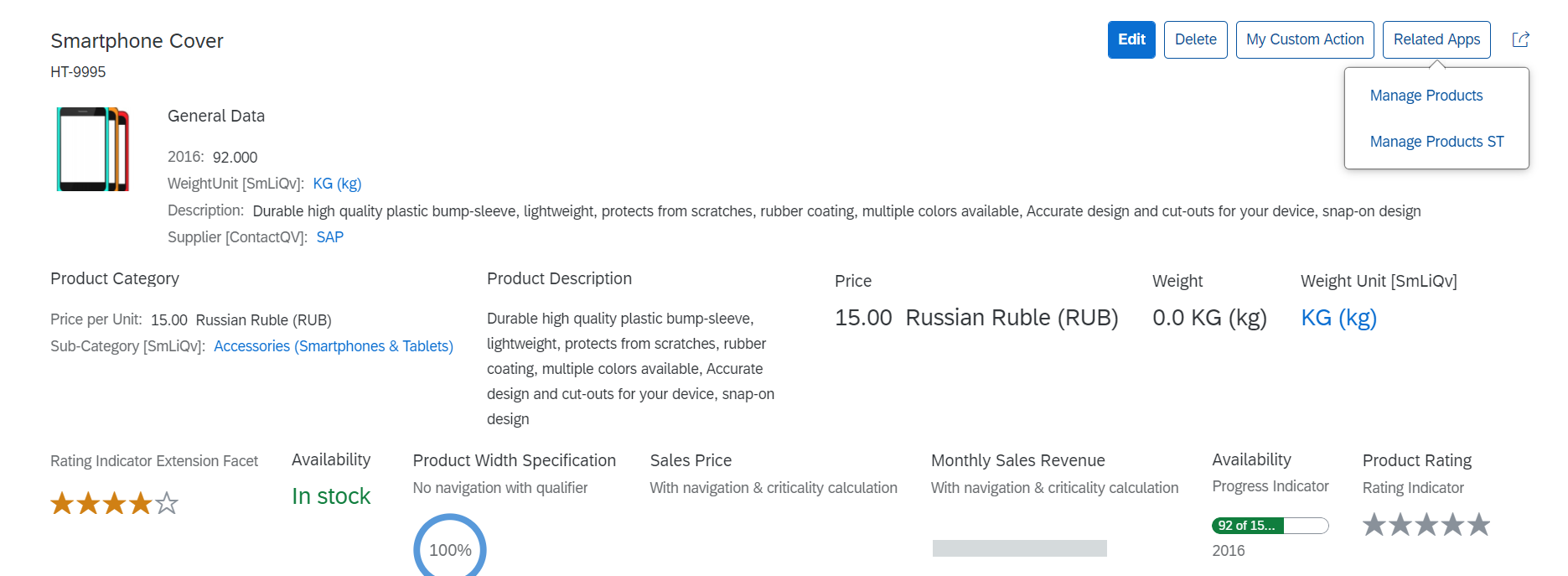
The Related Apps button is displayed on the object page if you set the
showRelatedApps parameter to true in the
manifest.json file.
manifest.json
"SalesOrderManageObjectPage":{
   "type": "Component",
   "id": "SalesOrderManageObjectPage",
   "name": "sap.fe.templates.ObjectPage",
   "options":{
      "settings":{
         ...
         ...
         "showRelatedApps": true,
         ...
         ...
      }
   }
}
If a user chooses this button, the navigation targets of the given semantic object are displayed. The semantic object is taken from the app that's currently open (see the hash in the app's URL). Apps with the same semantic object but different actions are shown in the popover.
When making a call to the SAP Fiori launchpad to determine the related apps through the
GetLinks API, SAP Fiori elements passes all the
semantic keys if they are available. If not all semantic keys are available, then SAP Fiori elements passes all the
technical keys.
Hiding Actions for a Semantic Object
You can hide actions of a semantic object in the specific context of an SAP Fiori elements app. To do so, you
can use the SemanticObjectUnavailableActions annotation to define a list of
actions that can be excluded in the context of a specific app.
For example, you can hide the displayFactSheet action associated with
related app as shown in the following sample code:
XML Annotation
<Annotations Target="SalesOrderService.SalesOrderManage">
     …
     <Annotation Term="Common.SemanticObjectUnavailableActions">
          <Collection>
               <String>displayFactSheet</String>
          </Collection>
     </Annotation>
     <Annotation Term="Common.SemanticObject" String="SalesOrder"/>
     …
</Annotations>ABAP CDS Annotations
No ABAP CDS annotation sample is available. Please use the local XML annotation.
CAP CDS Annotation
Common.SemanticObjectUnavailableActions : ['displayFactSheet']
Adding Additional Links to Related Apps
You can add additional links under the Related Apps button of the
object page header. The links originate from the additional semantic objects defined in the
manifest.json file, as shown in the following example:
"SalesOrderManageObjectPage": {
    "type": "Component",
    "id": "SalesOrderManageObjectPage",
    "name": "sap.fe.templates.ObjectPage",
    "options": {
        "settings": {
            "contextPath": "/SalesOrderManage",
            "showRelatedApps": true,
            "additionalSemanticObjects": {
                "ProductCollection": {
                    unavailableActions: ["displayFactSheet", "reorderProduct"],
                    mapping: {
                        "SoldToParty": "Client",
                         .
                         .
                    }
                },
                "Customer": {
                    "unavailableActions": ["manage"],
                    "mapping": {
                        "SoldToParty": "Customer"
                    }
                }
            },
            ...
        }
    }
}
In the previous example , additionalSemanticObjects is the manifest
setting that you need to add under the object page section of the
manifest.json file. ProductCollection and
Customer refer to the additional semantic objects from which to obtain
additional links that are displayed under the Related Apps
button.
The array of unavailable actions defined in the preceding settings denote those navigation
actions of the semantic object which should not be displayed under the Related
Apps button. displayFactSheet and
reorderProduct don't appear in the Related Apps
menu (unless they happen to be actions defined for other additional semantic objects and are
not part of the unavailable actions there).
Mapping, defined for a semantic object, consists of key-value pairs. The
key defines the way in which the source application (object page) passes the context. The
value represents the term used for the same entity in the target app. In the previous
example, an object page context for SoldToParty like "SoldToParty"="001" is
passed using the specified target name (Customer) instead of
SoldToParty. So the target receives "Customer"="001" in the app
context.
You can also use the allowedActions key in the
manifest.json file to define the exact list of semantic object links to
be displayed under the Related Apps button:
"SalesOrderManageObjectPage": {
    "type": "Component",
    "id": "SalesOrderManageObjectPage",
    "name": "sap.fe.templates.ObjectPage",
    "options": {
        "settings": {
            "contextPath": "/SalesOrderManage",
            "showRelatedApps": true,
            "additionalSemanticObjects": {
                "SalesOrder": {
                    allowedActions: ["create", "managev2"],
                "ProductCollection": {
                    allowedActions: ["displayFactSheet"],
                    mapping: {
                        "SoldToParty": "Client",
                         .
                         .
                    }
                },
            },
            ...
        }
    }
}
In this example, three application links appear in the Related Apps menu.
-
Links from additional semantic objects are only considered if you have set the
showRelatedAppsparameter totruein themanifest.jsonfile. -
When you use the
allowedActionskey, theunavailableActionskey is ignored. -
If you do not list any links under
allowedActions, no applications for the semantic objects are shown under the Related Apps button.
Supporting the Mapping of Default Links in Related Apps
When working with default links, if the technical field name of the field on the object page and the corresponding field in the target app differ, application developers can define a mapping between these fields. This mapping enables passing the context between these fields, even though their technical field names are different.
To create this mapping, you can use Common.SemanticObject and
Common.SemanticObjectMapping annotation as shown in the following sample
codes:
XML Annotation
<Annotations Target="com.c_salesordermanage_sd.SalesOrderManage">
    <Annotation Term="Common.SemanticObject" String="SalesOrder"/>
    <Annotation Term="Common.SemanticObjectMapping">
        <Collection>
            <Record Type="Common.SemanticObjectMappingType">
                <PropertyValue Property="LocalProperty" PropertyPath="SoldToParty"/>
                <PropertyValue Property="SemanticObjectProperty" String="Customer"/>
            </Record>
        </Collection>
    </Annotation>
</Annotations>
ABAP CDS Annotation
annotate view SalesOrderManage with {
   @Consumption.semanticObject: 'SalesOrder'
   @Consumption.semanticObjectMapping.additionalBinding: [{element: 'Customer', localElement: 'SoldToParty'}]
   Customer
}CAP CDS Annotation
entity SalesOrderManage
@(
  Common: {
    SemanticObject: 'SalesOrder',
    SemanticObjectMapping: [
      {
        LocalProperty: SoldToParty,
        SemanticObjectProperty: 'Customer'
      }
    ]
  }
)
You mustn't define a mapping between the fields on the object page and the additional
links added through the additionalSemanticObjects property in the
manifest.json file.
To map to these additional links, use the manifest settings as provided in the following section of this topic.
For information about SAP Fiori elements for OData V2, see Enabling the Related Apps Button.