Hiding Features Using the UI.Hidden
Annotation
UI.Hidden annotation to hide or display specific
features on the object page in SAP Fiori elements for OData
V4.The default value of the UI.Hidden annotation is true,
that is, a feature using the UI.Hidden annotation term isn't visible on
the UI. These are the values you can set:
| Annotation | System Behavior |
|---|---|
<Annotation Term="UI.Hidden"/> |
The default value is |
<Annotation Term="UI.Hidden"
Bool="false"/> |
Properties or facets annotated with this term are not hidden, as |
<Annotation Term="UI.Hidden" Bool="true"/> |
Properties or facets annotated with this term are hidden, as
|
<Annotation Term="UI.Hidden"
Path="edit_mode"/> |
Properties or facets annotated with this term are not hidden if the path
( The path associated with |
|
<Annotation Term="UI.Hidden">
    <If>
        <Or>
            <Eq>
                <Path>displayCriteria</Path>
                <String>value_A</String>
            </Eq>
            <Eq>
                <Path>displayCriteria</Path>
                <String>value_B</String>
            </Eq>
        </Or>
    </If>
</Annotation> |
|
Header Facets on Object Page
You can hide header facets on the object page, as shown in the following sample code:
XML Annotation
<Annotation Term="UI.HeaderFacets">
    <Collection>
        <Record Type="UI.ReferenceFacet">
            <PropertyValue Property="Label" String="Net Amount" />
            <PropertyValue Property="ID" String="NetValueDataHeader" />
            <PropertyValue Property="Target" AnnotationPath="@UI.DataPoint#NetValue" />
            <Annotation Term="UI.Hidden" Bool="true" />
        </Record>
        <Record Type="UI.ReferenceFacet">
            <PropertyValue Property="Label" String="Contact Info" />
            <PropertyValue Property="ID" String="ContactHeader" />
            <PropertyValue Property="Target" AnnotationPath="_SoldToParty/@Communication.Contact" />
             <Annotation Term="UI.Hidden" />
        </Record>
        <Record Type="UI.ReferenceFacet">
            <PropertyValue Property="Label" String="Credit Limit Consumption" />
            <PropertyValue Property="ID" String="CreditLimitChartHeader" />
            <PropertyValue Property="Target" AnnotationPath="_CreditLimitDetails/@UI.Chart#CreditLimitChart" />
             <Annotation Term="UI.Hidden" Path="editActionIsEnabled" />
        </Record>
    </Collection>
</Annotation>ABAP CDS Annotation
@UI.Facet: [
  {
    hidden: true,
    label: 'Net Amount',
    id: 'NetValueDataHeader',
    targetQualifier: 'NetValue',
    type: #DATAPOINT_REFERENCE,
    purpose: #HEADER
  },
  {
    hidden: true,
    label: 'Contact Info',
    id: 'ContactHeader',
    targetElement: '_SOLDTOPARTY',
    type: #CONTACT_REFERENCE,
    purpose: #HEADER
  },
  {
    hidden: #(editActionIsEnabled),
    label: 'Credit Limit Consumption',
    id: 'CreditLimitChartHeader',
    targetQualifier: 'CreditLimitChart',
    targetElement: '_CREDITLIMITDETAILS',
    type: #CHART_REFERENCE,
    purpose: #HEADER
  }
]
Test;CAP CDS Annotation
HeaderFacets                                    : [
    {
        $Type             : 'UI.ReferenceFacet',
        Label             : 'Net Amount',
        ID                : 'NetValueDataHeader',
        Target            : '@UI.DataPoint#NetValue',
        ![@UI.Hidden] : true
     },
    {
        $Type             : 'UI.ReferenceFacet',
        Label             : Contact Info',
        ID                : 'ContactHeader',
        Target            : '_SoldToParty/@Communication.Contact',
        ![@UI.Hidden] : true
    },
    {
        $Type             : 'UI.ReferenceFacet',
        Label             : 'Credit Limit Consumption',
        ID                : 'CreditLimitChartHeader',
        Target            : '_CreditLimitDetails/@UI.Chart#CreditLimitChart',
        ![@UI.Hidden] : editActionIsEnabled
    }
    ]
You cannot use the UI.Hidden annotation to hide the entire
UI.FieldGroup and UI.Identification. To hide
them, you must hide all the DataField records within them.
You can use the UI.Hidden annotation to hide the wrapper around the
FieldGroup which is normally the
ReferenceFacet or the DataFieldForAnnotation.
Sections on Object Page
You can hide an entire section and a specific subsections within it. To hide a subsection, hide the content within the subsection. For more information, see the DataField Records in Header Facets section in this topic.
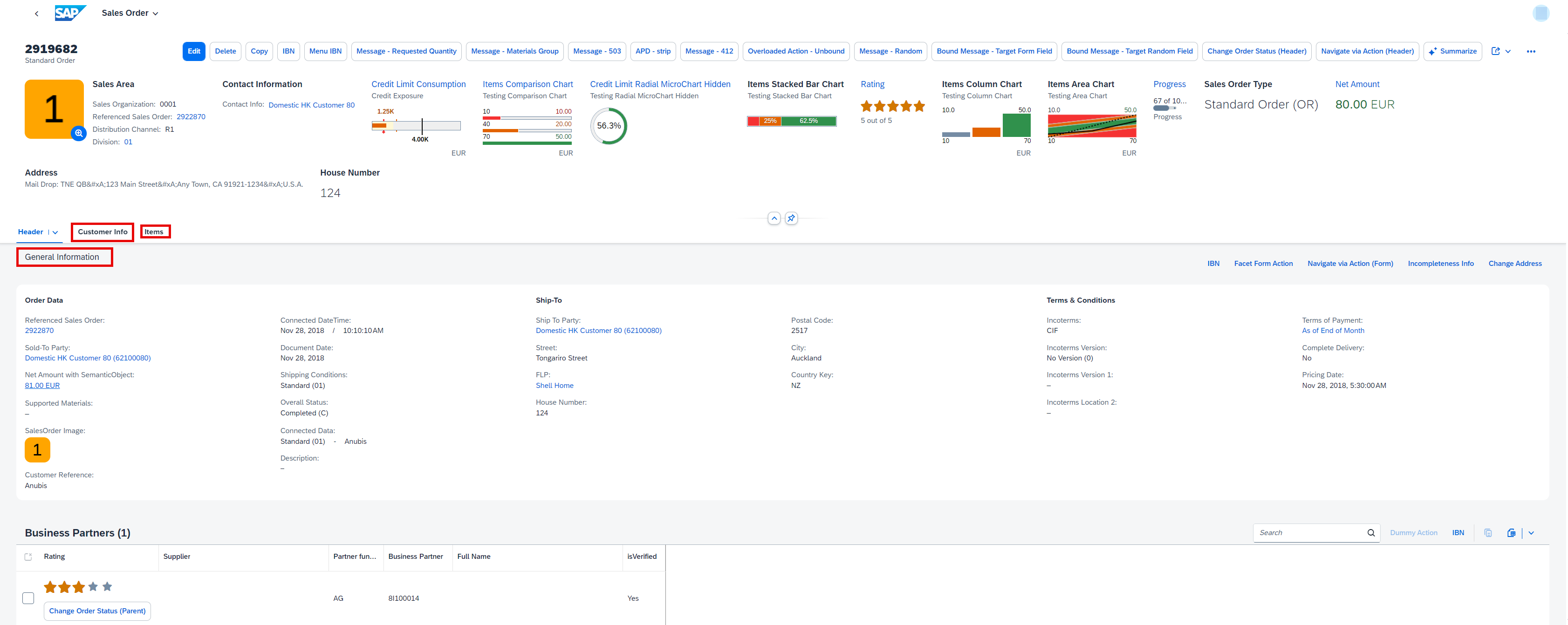
XML Annotation
<Annotation Term="UI.Facets">
    <Collection>
        <Record Type="UI.CollectionFacet">
            <PropertyValue Property="Label" String="Header" />
            <PropertyValue Property="ID" String="HeaderInfo" />
            <PropertyValue Property="Facets">
                <Collection>
                    <Record Type="UI.CollectionFacet">
                        <PropertyValue Property="ID" String="GeneralInfo" />
                        <PropertyValue Property="Label" String="General Information" />
                        <PropertyValue Property="Facets">
                            <Collection>
                                ……..
                               …….
                            </Collection>
                        </PropertyValue>
                       <Annotation Term="UI.Hidden" Bool="true" />
                   </Record>
               </Collection>
           </PropertyValue>
       </Record>
    </Collection>
</Annotation>ABAP CDS Annotation
@UI.Facet: [
  {
    label: 'Header',
    id: 'HeaderInfo',
    type: #COLLECTION,
    purpose: #STANDARD
  },
  {
    hidden: true,
    id: 'GeneralInfo',
    label: 'General Information',
    parentId: 'HeaderInfo',
    purpose: #STANDARD
  },
  …..
  …..
]
Test;CAP CDS Annotation
Facets                                          : [
{
        $Type  : 'UI.CollectionFacet',
s
        Label  : 'Header',
        ID     : 'HeaderInfo',
        Facets : [
        {
                $Type             : 'UI.CollectionFacet',
                ID                : 'GeneralInfo',
                Label             : 'General Information',
                Facets            : [
                    ……
                   ……
                ],
                ![@UI.Hidden]     : true
        }]
}]
Content in Quick Views
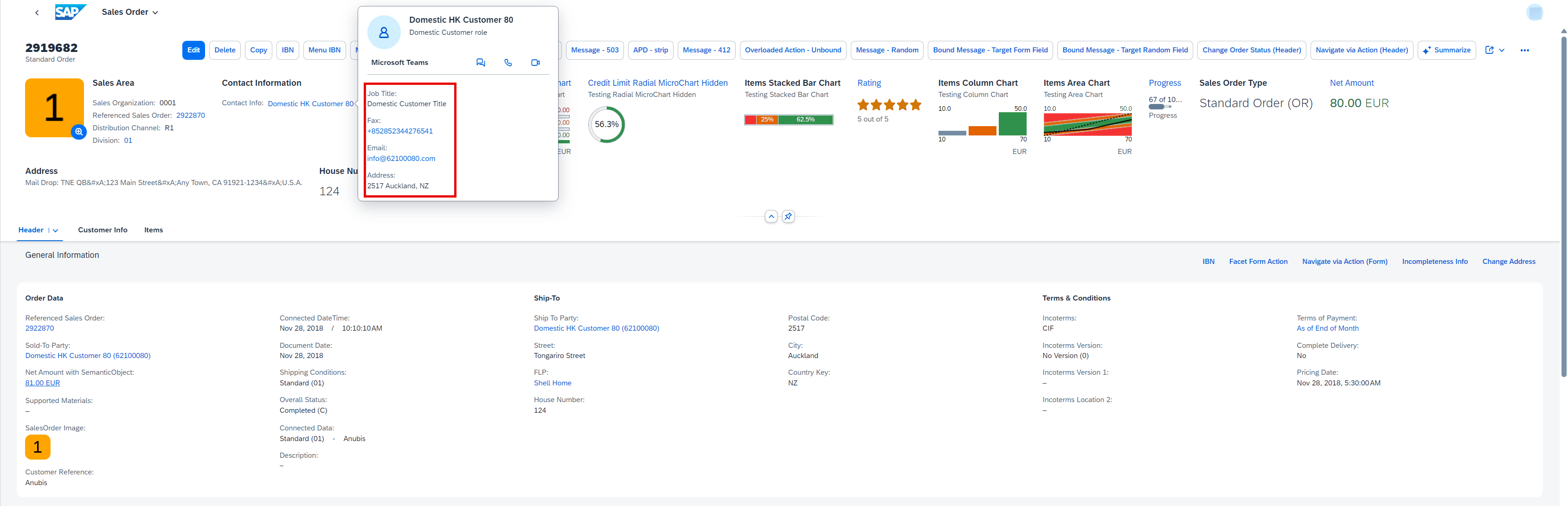
You can hide content in quick views, such as field groups, as shown in the following image:
XML Annotation
<Annotation Term="UI.QuickViewFacets">
    <Collection>
        <Record Type="UI.ReferenceFacet">
            <PropertyValue Property="Label" String="Material" />
            <PropertyValue Property="Target" AnnotationPath="@Communication.Contact" />
            <Annotation Term="UI.Hidden" Bool="true" />
        </Record>
        <Record Type="UI.ReferenceFacet">
            <PropertyValue Property="Label" String="Address" />
            <PropertyValue Property="Target" AnnotationPath="@UI.FieldGroup#SoldToQuickView" />
            <Annotation Term="UI.Hidden" Path="edit_Ac" />
        </Record>
    </Collection>
</Annotation>ABAP CDS Annotation
@UI.Facet: [
  {
    hidden: true,
    label: 'Material',
    type: #CONTACT_REFERENCE,
    purpose: #QUICK_VIEW
  },
  {
    hidden: #(edit_Ac),
    label: 'Address',
    targetQualifier: 'SoldToQuickView',
    type: #FIELDGROUP_REFERENCE,
    purpose: #QUICK_VIEW
  }
]
Test;CAP CDS Annotation
UI.QuickViewFacets        : [
   {
        $Type  : 'UI.ReferenceFacet',
        Label  : 'Material',
        Target : '@Communication.Contact',
        ![@UI.Hidden]     : true
    },
    {
        $Type  : 'UI.ReferenceFacet',
        Label  : 'Address',
        Target : '@UI.FieldGroup#SoldToQuickView',
        ![@UI.Hidden]     : edit_Ac
   }
]
You can also use the aforementioned annotation to hide content in quick views within the list report.
DataField Records in Header Facets
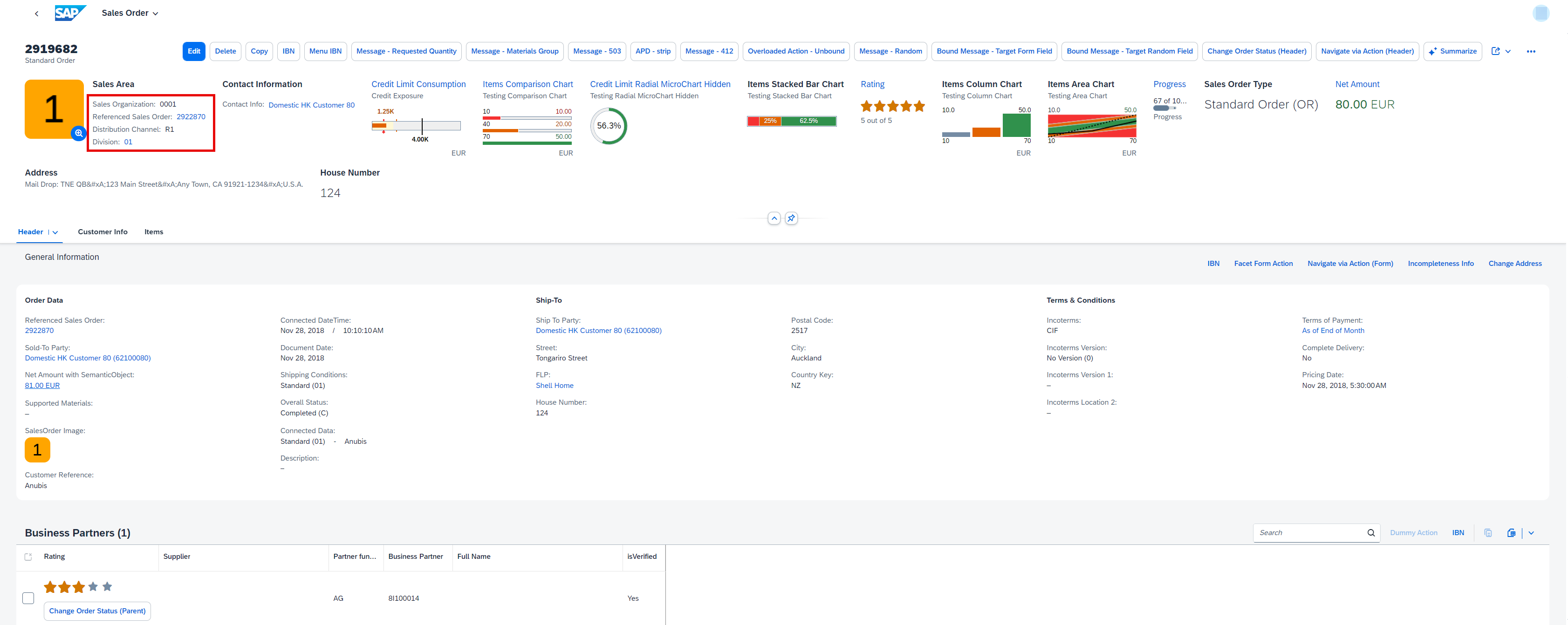
You can hide DataField records, for example,
UI.DataField, UI.DataFieldForAnnotation in
facets as shown in the following image:
XML Annotation
<Annotation Term="UI.FieldGroup" Qualifier="OrgData">
    <Record Type="UI.FieldGroupType">
        <PropertyValue Property="Data">
            <Collection>
                <Record Type="UI.DataField">
                    <PropertyValue Property="Value" Path="SalesOrganization" />
                    <Annotation Term="UI.Hidden" Bool="true" />
                </Record>
               <Record Type="UI.DataField">
                   <PropertyValue Property="Value" Path="DistributionChannel" />
                   <Annotation Term="UI.Hidden" Path="Delivered" />
               </Record>
            </Collection>
        </PropertyValue>
    </Record>
</Annotation>ABAP CDS Annotation
@UI.fieldGroup: [
  {
    hidden: true,
    value: 'SALESORGANIZATION',
    type: #STANDARD,
    qualifier: 'OrgData'
  }
]
SALESORGANIZATION;

@UI.fieldGroup: [
  {
    hidden: #(Delivered),
    value: 'DISTRIBUTIONCHANNEL',
    type: #STANDARD,
    qualifier: 'OrgData'
  }
]
DISTRIBUTIONCHANNEL;CAP CDS Annotation
FieldGroup #OrgData                             : [
{
        Label : 'Org Data',
        Data  : [
        {
            $Type             : 'UI.DataField',
            Value             : SalesOrganization,
            ![@UI.Hidden]     : true
        }
        {
            $Type             : 'UI.DataField',
            Value             : DistributionChannel,
            ![@UI.Hidden]     : Delivered
        }]
}]
DataField Records in Facets
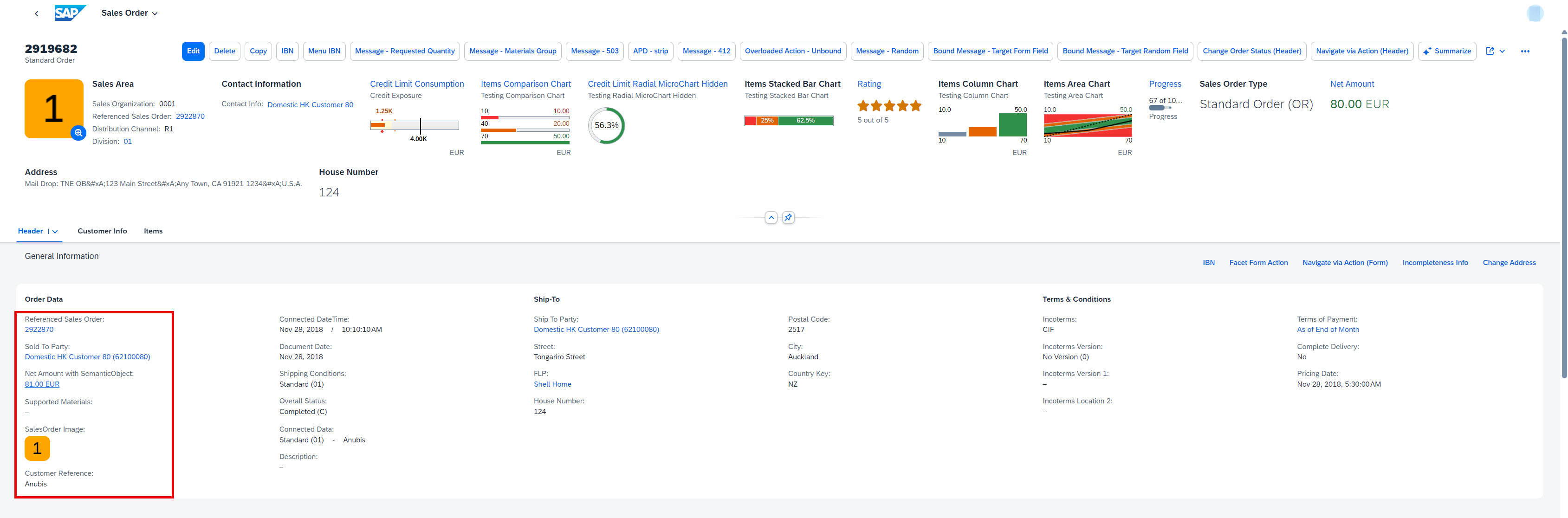
You can hide DataField records, for example,
UI.DataField, UI.DataFieldForAnnotation in
facets as shown in the following image:
You cannot use the UI.Hidden annotation to hide an entire
UI.FieldGroup or UI.Identification. To hide
them, you must hide all DataField records within them or use the
UI.Hidden annotation to hide the wrapper around the
FieldGroup, which is typically the
ReferenceFacet or the DataFieldForAnnotation,
as shown in the following sample code:
XML Annotation
<Annotation Term="UI.FieldGroup" Qualifier="OrderData">
     <Record Type="UI.FieldGroupType">
         <PropertyValue Property="Data">
            <Collection>
                <Record Type="UI.DataField">
                    <PropertyValue Property="Value" Path="SoldToParty" />
                    <Annotation Term="UI.Hidden" Bool="true" />
                </Record>
                <Record Type="UI.DataField">
                    <PropertyValue Property="Value" Path="ImageUrl" />
                    <Annotation Term="UI.Hidden" Path="edit_Ac" />
                </Record>
                 …..
                   ……
            </Collection>
        </PropertyValue>
    </Record>
</Annotation>ABAP CDS Annotation
@UI.fieldGroup: [
  {
    hidden: true,
    value: 'SOLDTOPARTY',
    type: #STANDARD,
    qualifier: 'OrderData'
  }
]
SOLDTOPARTY;

@UI.fieldGroup: [
  {
    hidden: #(edit_Ac),
    value: 'IMAGEURL',
    type: #STANDARD,
    qualifier: 'OrderData'
  }
]
IMAGEURL;CAP CDS Annotation
FieldGroup #OrderData                           : {Data : [
   {
        $Type             : 'UI.DataField',
        Value             : SoldToParty,
        ![@UI.Hidden]     : true
   },
   {
        $Type             : 'UI.DataField',
        Value             : ImageUrl,
        ![@UI.Hidden]     : edit_Ac
    },
    …..
   ……
]}
DataField Records in Tables
A table column isn't rendered if the static value of UI.Hidden is
true.
XML Annotation
<Annotation Term="UI.LineItem">
    <Collection>
        <Record Type="UI.DataFieldForAction">
            <PropertyValue Property="Label" String="Bound Action with params" />
            <PropertyValue Property="Action" String="com.c_salesordermanage_sd_aggregate.CreateWithSalesOrderType" />
            <Annotation Term="UI.Hidden" Bool="true" />
        </Record>
    </Collection>
</Annotation>ABAP CDS Annotation
@UI.lineItem: [
  {
    hidden: true,
    label: 'Bound Action with params',
    dataAction: 'com.c_salesordermanage_sd_aggregate.CreateWithSalesOrderType',
    type: #FOR_ACTION
  },
]
TEST;CAP CDS Annotation
LineItem                                        : {
        $value             : [
        {
            $Type  : 'UI.DataFieldForAction',
            Label  : 'Bound Action with params',
            Action : 'com.c_salesordermanage_sd.CreateWithSalesOrderType',
            ![@UI.Hidden] : true
        },
]
Even if you hide all determining actions in the footer, the UI still displays the footer because it is required to show any bound messages from the back end.
For information about SAP Fiori elements for OData V2, see Hiding Features Using the UI.Hidden Annotation.